
Program Name
Kulltivate.ai Client Notifications
About Our SMS Program
Kulltivate.ai (operated by Drew Kull, Canton, MA) sends SMS messages to business clients who choose to receive them when they sign in to the Kulltivate.ai client portal. This page describes our SMS program, what messages you will receive, how you opt in, and how to opt out.
What Messages You Will Receive
By opting in to Kulltivate.ai SMS messages, you may receive the following types of messages:
- Sign-in links: A link, sent when you ask for one, that signs you in to your Kulltivate.ai client portal.
- Chatbot handoff alerts: Notifications when your AI chatbot detects a customer who needs human assistance.
- Portal notifications: Notifications about activity in your Kulltivate.ai client portal.
- Account alerts: Alerts about your Kulltivate.ai client account.
No marketing or promotional messages are sent. All messages are operational only.
Message Frequency
Msg frequency varies (typically 1–10 msgs/wk). Actual frequency depends on your portal login activity and chatbot usage.
Message and Data Rates
Message and data rates may apply. Check with your wireless carrier for details. Carriers are not liable for delayed or undelivered messages.
How You Opt In
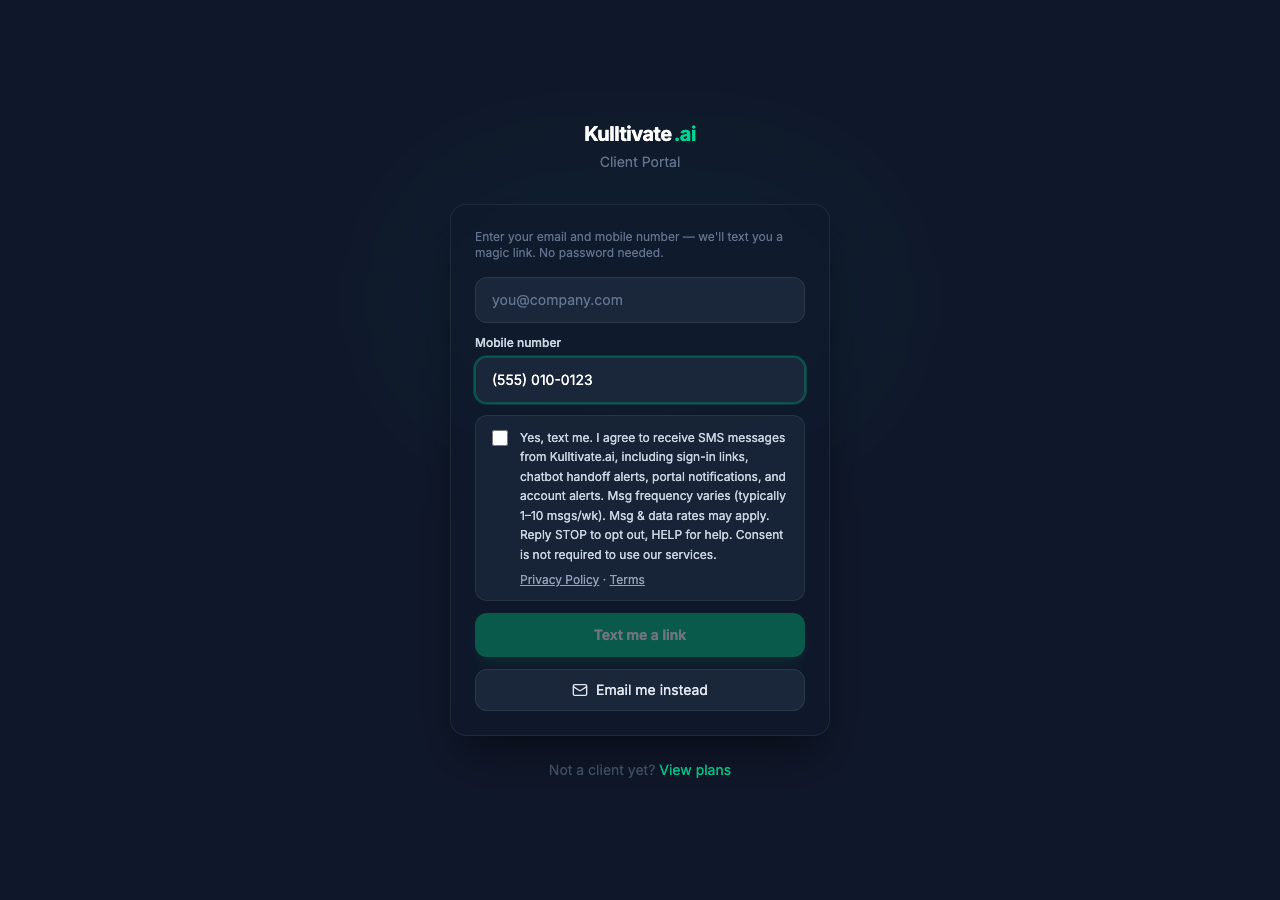
The only way to opt in to Kulltivate.ai SMS messages is on the portal login page at kulltivate.ai/portal/login, by choosing “Text me instead”, entering your cell number and ticking an unchecked box next to this disclosure:
SMS Consent Disclosure
Yes, text me. I agree to receive SMS messages from Kulltivate.ai, including sign-in links, chatbot handoff alerts, portal notifications, and account alerts. Msg frequency varies (typically 1–10 msgs/wk). Msg & data rates may apply. Reply STOP to opt out, HELP for help. Consent is not required to use our services.
The text sign-in view can also be opened directly at https://www.kulltivate.ai/portal/login?method=sms.
View a screenshot of the opt-in screen: the cell number field, the unchecked consent box and the disclosure, as they appear on the login page.
How Consent Is Collected
Consent is collected on the portal login page and nowhere else. The flow works like this:
- Go to kulltivate.ai/portal/login. The page opens in email mode, with two sign-in buttons at the top, “Email” and “Text me instead”, an email field and an “Email me a link” button. Email sign-in needs no SMS consent.
- Tap “Text me instead”. The page switches to text mode: the email field is replaced by a “Cell number” field (“Use the cell number linked to your account.”) and an unchecked checkbox beside the SMS consent disclosure above. Text mode does not ask for an email address.
- Enter your cell number.
- Tick the checkbox. It is never pre-checked, and it is cleared each time you switch between email and text mode.
- Tap “Text me a link”. The button stays disabled until you have entered a valid cell number and ticked the checkbox.
- We send the sign-in link by text only if the cell number you typed matches the number on file for your portal account. The text always goes to the number on file, never to a different number you type. If it does not match, no text is sent and the page says: “We don't have this number on an account. Sign in with your email, then add your cell in Settings to sign in by text.”
On a device where you have already ticked the box for that number, after you enter that number the page shows “Texts are on for” and the last four digits of the number in place of the checkbox, and a “Use a different number” button that brings the unchecked box back.
You can always sign in by email instead. We do not require SMS consent to use our services.
See our Privacy Policy and Terms of Service for details.
How to Opt Out
You can stop receiving SMS messages from Kulltivate.ai at any time:
- Reply STOP to any message from Kulltivate.ai
- Email help@kulltivate.ai and request to be removed
After opting out, you will receive a single confirmation message. No further messages will be sent unless you opt back in.
How to Get Help
Reply HELP to any message from Kulltivate.ai for assistance, or contact us:
- Email: help@kulltivate.ai
- Website: kulltivate.ai
How to Opt Back In
If you previously opted out and want to receive messages again:
- Reply START to our number
- Contact us at help@kulltivate.ai
Sample Messages
These are the messages you may receive. Every message starts with the Kulltivate.ai name. Sign-in and question messages end with “Reply STOP to opt out.” Links go to kulltivate.ai only; we do not use link shorteners. Names and links below are examples.
Sign-in link (sent after you tap “Text me a link”)
Kulltivate.ai: Here's your sign-in link for your client portal: https://www.kulltivate.ai/portal/auth/verify?token=EXAMPLE-TOKEN Didn't request this? Ignore it. Reply STOP to opt out.
Client question (sent to a number that opted in on the login page)
Kulltivate.ai: Hi Pat, Drew's AI assistant here. Quick question about your business hours: What time do you open on Saturdays? Just reply to this message. Reply STOP to opt out.
Reply START
Kulltivate.ai: You're opted in to Kulltivate.ai Client Notifications (sign-in links, chatbot alerts, portal notifications, account alerts). Msg frequency varies. Msg & data rates may apply. Reply HELP for help, STOP to opt out.
Reply HELP
Kulltivate.ai Client Notifications: email help@kulltivate.ai. Msg & data rates may apply. Reply STOP to opt out.
Reply STOP
Kulltivate.ai: You're unsubscribed and won't receive more texts. Reply START to resubscribe.
Privacy & Data
We do not sell, rent, or share your phone number with third parties for marketing purposes. Your phone number is used solely to deliver Kulltivate.ai operational messages as described above.
For full details on how we handle your data, see our Privacy Policy and Terms of Service.
Kulltivate.ai · Operated by Drew Kull · Canton, MA · help@kulltivate.ai